The electronic invoicing reform will change the way invoices are handled, but it says nothing about what happens once an invoice has reached you. Yet this is precisely where the day-to-day time savings come into play: between the moment a supplier’s invoice arrives at your business and the moment it becomes an accounting entry sent to your accountant, there is a series of steps which, if done manually, eat up hours every month.
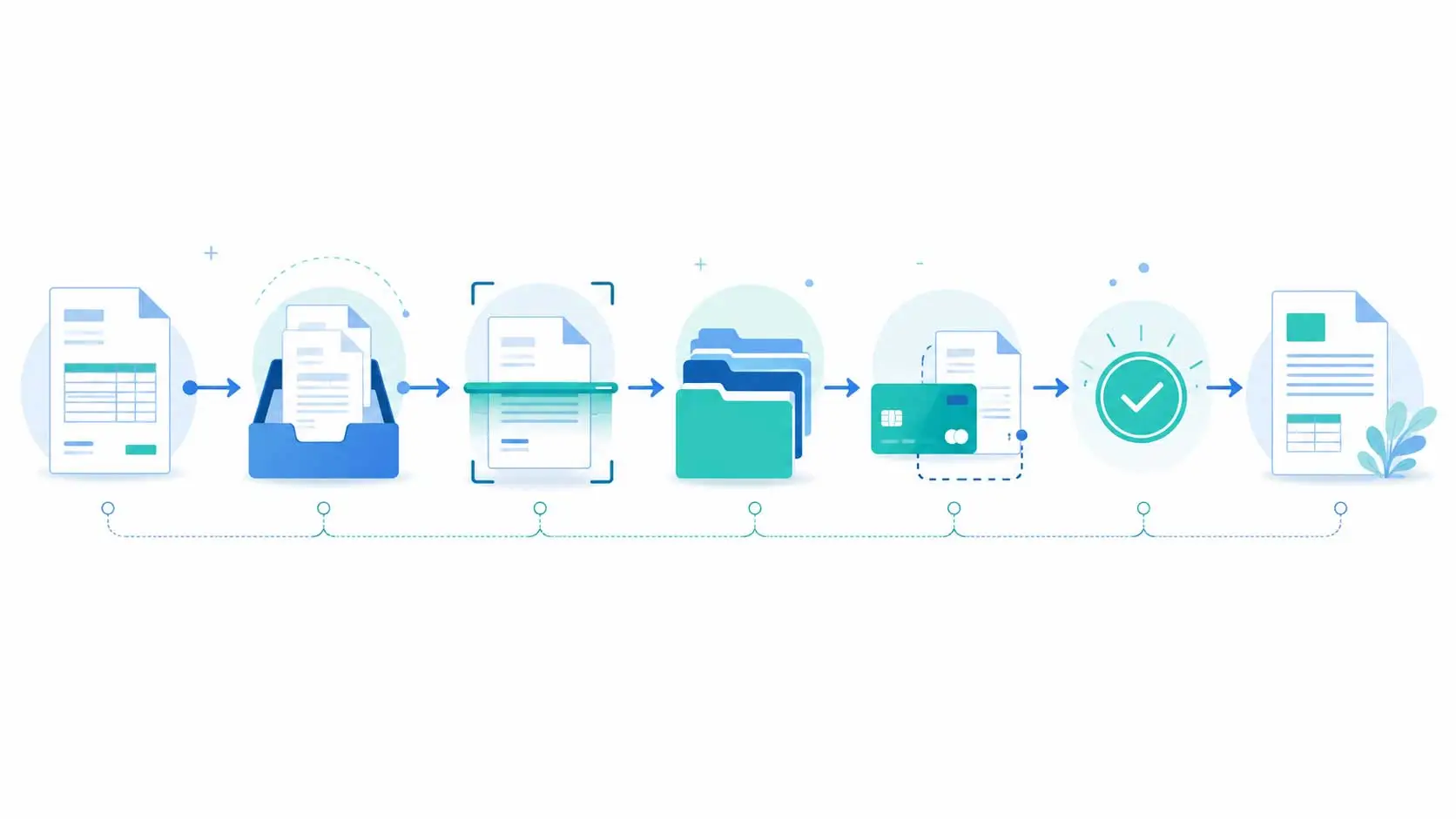
To give you a practical example, let’s follow a supplier invoice — let’s just call it ‘your invoice’ — through its journey in Azopio once the reform has come into force. Each stage corresponds to a feature of the platform.
Step 1 — Receipt, regardless of format
From 1 September 2026, an invoice between businesses subject to VAT will only be valid if it is sent via an approved platform, in a structured electronic format (Factur-X, UBL or CII). PDFs sent by email, on the other hand, will no longer be valid electronic invoices.
But in practice, not all your suppliers will move at the same pace. Some will already have switched to electronic invoicing: their invoices will arrive in accordance with the regulations, via an approved platform. Others will continue, for the time being, to send PDFs or paper invoices — outside the regulatory framework — whilst they bring their systems up to date.
Azopio handles both scenarios. As an Approved Platform registered with the DGFiP, Azopio receives compliant electronic invoices directly. And for those that still arrive via traditional channels, automatic collection takes over: linking your email account, a dedicated drop-off address to which your suppliers send their invoices directly, bulk upload via drag-and-drop, or a photo of a paper invoice via the Azopio Snap mobile app.
The result: however it is issued, ‘your bill’ will arrive in a single place, without you having to sort it.
Step 2 — Reading data: beyond OCR
Once ‘your invoice’ arrives, Azopio extracts the key details: supplier name, date, invoice number, currency, amounts excluding VAT, VAT and total including VAT. Whereas a conventional OCR system simply reads characters, Azopio’s artificial intelligence understands the document’s structure and identifies the correct fields, even if ‘your invoice’ has an unusual layout.
An important point to note regarding the reform: if ‘your invoice’ has been received in a structured electronic format via the PA, it already contains its data natively, without requiring a recognition stage — so there is no need for interpretation, and therefore no risk of reading errors. If it arrived as a PDF or on paper, the AI takes over. In both cases, all you need to do is check — and correct if necessary — the suggested data to ensure complete accuracy before posting.
Step 3 — Filing and archiving
‘Your invoice’ is then automatically categorised according to a predefined system: by year and month of issue, and by category (supplier invoice, customer invoice, supporting document, bank statement, other document). It is archived in Azopio’s digital vault, on secure servers in Europe (our primary servers are located in France). This is no minor detail in the age of electronic invoicing: secure archiving is integral to the process of document retention, a topic we cover in detail in our article on the benefits of an EDM system for electronic invoicing. Combined with the search engine, this filing system allows you to find any invoice in a single click, by keyword or by amount.
Step 4 — Automatic bank reconciliation
As your bank account is linked to Azopio, the platform retrieves your transactions in real time and automatically matches ‘your invoice’ with the corresponding payment. All you need to do is confirm the suggested match with a single click. The result: every transaction is accompanied by its supporting document, with full traceability — and no invoice is overlooked.
Step 5 — Validation, if required by your organisation
In an organisation where purchase invoices must be approved before payment, ‘your invoice’ may be routed through an approval process. Each person involved approves the invoice at their own level, and the invoice only moves on once the approval process is complete. This step is optional: a very small business will skip it, whilst a multi-service SME will find it provides a genuine internal control mechanism.
Step 6 — Payment
Once approved, ‘your invoice’ can be paid directly via Azopio, without having to log in to your bank’s online banking platform. You can track invoices that are due and pending payment via clear dashboards, which also help you manage your reminders and optimise the timing of your payments to suit your cash flow.
Step 7 — Recording the entries and sending them to the accountant
The final stage of the process: the verified data from ‘your invoice’ is converted into an accounting entry, which can be exported to your accounting software or accessed directly by your accountant, who can view your supporting documents in real time and in complete security. No more re-entering data, no more email exchanges to retrieve a missing supporting document. ‘Your invoice’ will have travelled the entire journey, from your inbox to the accounts department, with minimal manual intervention on your part.
One journey, one platform
As you follow this process, one thing is immediately apparent: at no point did you have to leave Azopio or re-enter any data that was already there. Electronic invoicing is just the starting point. Once this invoice has been received in accordance with the regulations, Azopio automatically handles every step right through to the accounts. Compliance, ensured by the Approved Platform included in every subscription, forms the foundation; the real benefit is the time you save on your day-to-day management tasks.
This end-to-end approach is also what distinguishes genuine automated pre-accounting from a simple compliance tool. This process, from receipt to journal entry, is exactly what is known as pre-accounting. If you’d like to explore the concept in more depth, our article ‘What is pre-accounting? ’ is entirely devoted to this topic.
👉 Find out how Azopio automates your invoice processing, from receipt to accounting.
Discover Azopio
👉 Azopio is an Approved Platform registered with the DGFiP, included in all subscriptions.
Find out more about the Azopio PA